Source evidence
Sources and suggestions remain available so reviewers can see where values came from and spot ambiguities.

OptyWeb · Assisted automation
AI Orders interprets incoming email requests, reads documents, identifies glass and processing, checks the ERP catalogue and applies reviewed customer rules. Your team validates exceptions before creating a Portal Order.
How it works
This is not a black box that invents part numbers: each stage handles a defined job and makes uncertainty visible.
The inbox collects requests and attachments for classification.
Organised intake
Separates orders from other messages before preparation.
Relevant requests
Reads text and document structure, including complex tables.
Source data
Identifies lines, quantities, sizes, glass layers, spacers and processing.
Structured order
Looks up ERP items and applies approved customer rules when applicable.
Suggested references
Staff resolve issues, confirm the Portal Order and can download its XML.
Controlled hand-off
Worked example
The model recognises what is actually written. Customer conventions are handled by approved rules, while missing data stays open for review.
“Hello, we need 10 units of 4/16/4 as usual. Thanks.”
Quantity
10
Glass make-up
4/16/4
An administrator can configure a customer-specific rule. For instance, certain non-float glass types may require edge processing, with exceptions for small sizes. Without a valid rule, the system should not assume that work.
Illustrative, fictional example. It is not a measured result or a real interpretation screenshot.
What you can realistically expect
Automation should not guess how each customer works. AI Orders combines initial document reading, company-specific rules and human oversight into one workflow.
Hypothetical example
Extracts information and suggests lines, sizes, glass make-ups, spacers and processing from the message and its files.
Cross-checks ERP catalogue items and applies approved rules. Corrections can generate suggestions for review.
A person confirms, corrects or holds uncertain details before an order is created.
Quality depends on source documents, ERP catalogue configuration and each company's rules. Accuracy must be measured with real examples.
Sources the module can read
The engine uses direct extraction for structured documents and visual AI for scanned or photographed content.

Plain text and HTML
Reads message bodies, subjects and relevant information to prepare an order request.
Digital and scanned PDFs
Extracts embedded text directly, or uses visual analysis for image-based pages.
JPG · JPEG · PNG · WEBP
Can analyse order photos, tables, sketches and handwritten annotations. Uncertain readings need review.
XLSX · CSV
Reads rows and columns from modern Excel workbooks or CSV files, retaining the source structure.
These formats refer to the AI Orders extraction engine, not every file type OptyWeb can attach. Handwriting, sketches and scans depend on legibility and the configured AI model; uncertain results require human review.
Our method
The goal is not to claim 100% automation, but to reduce repetitive work while preserving technical judgement and review.
Sources and suggestions remain available so reviewers can see where values came from and spot ambiguities.
Configuration can apply agreed conventions, items and exceptions without overriding what the customer explicitly states.
Human corrections can generate rule suggestions; activation is controlled, rather than blind automatic learning.
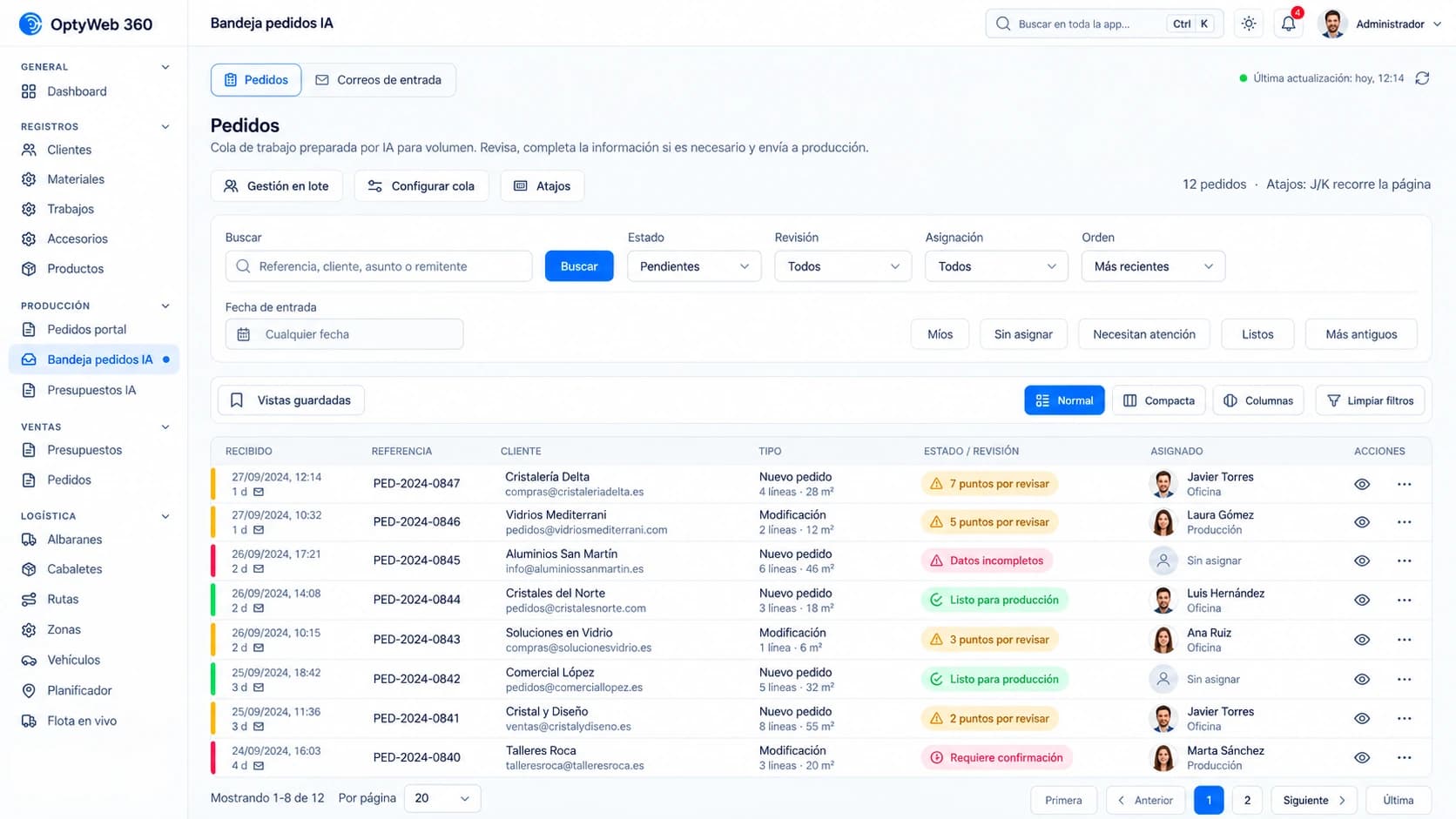
Product screenshots
Real OptyWeb screenshots using commercial demonstration data. The interpretation example above is explanatory, not a real product screenshot.
Incoming requests, statuses and items requiring review before proceeding.
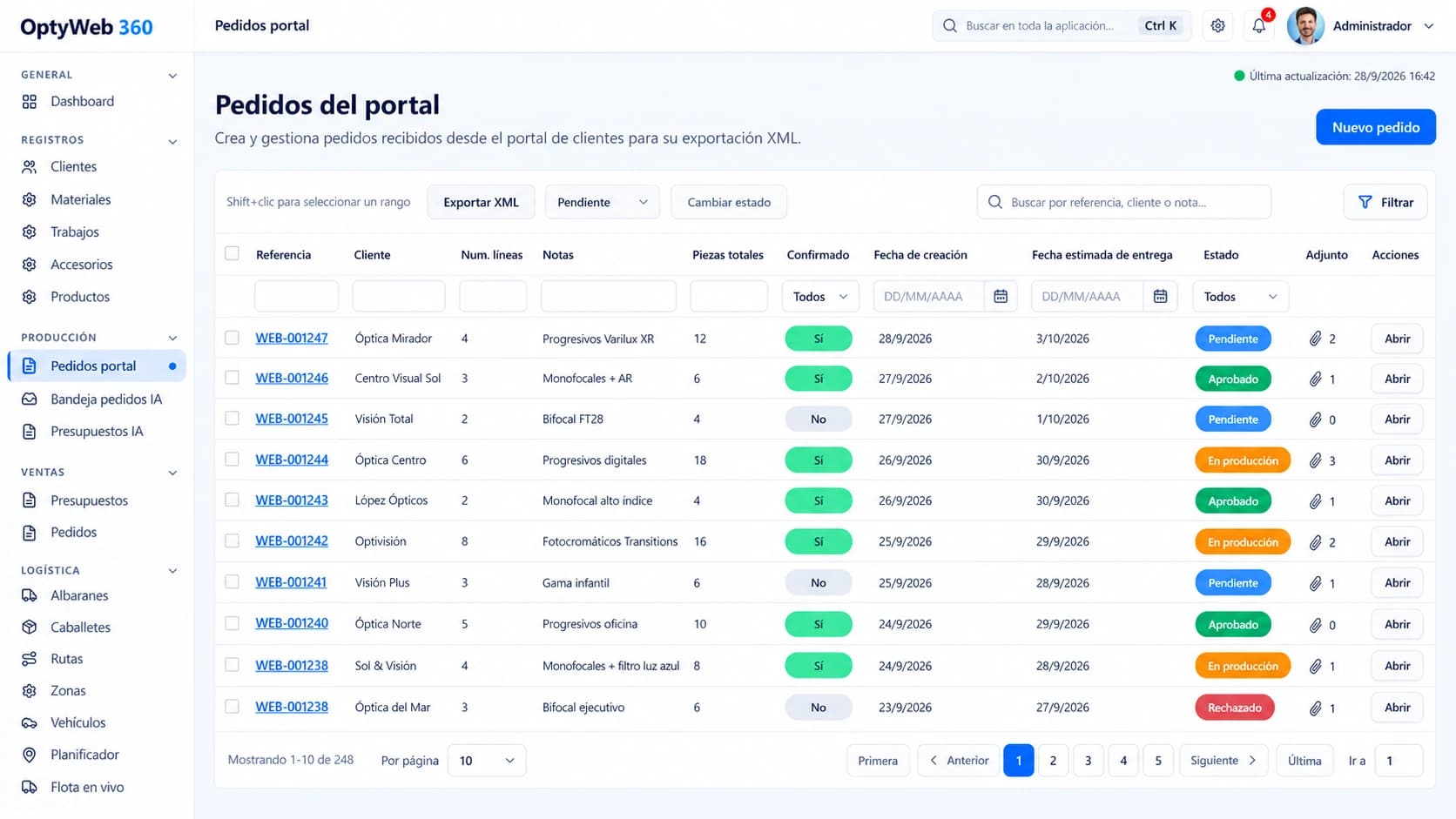
Once confirmed, the prepared order enters the Portal Orders flow for management and export.
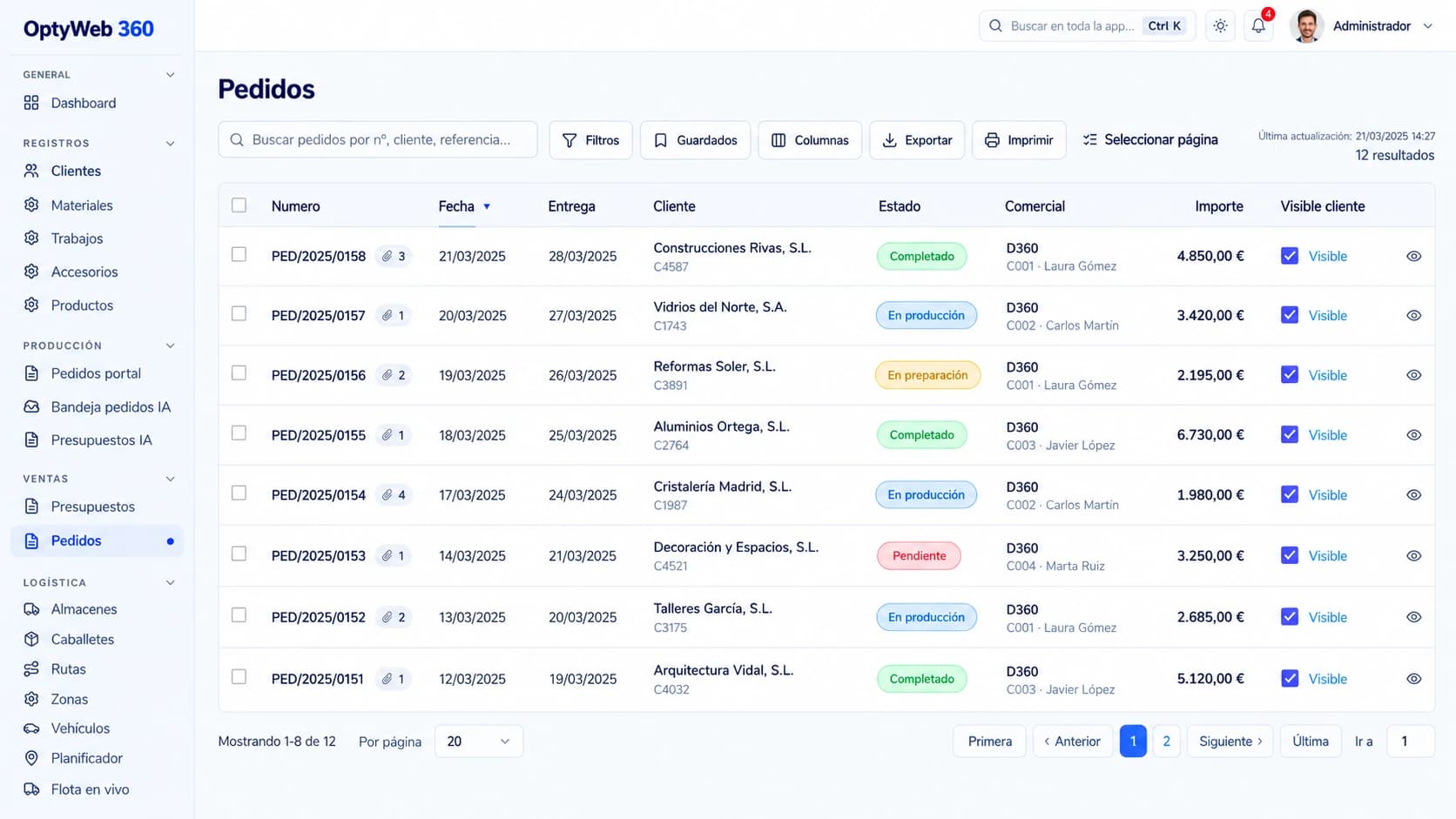
The ERP maintains its own orders and document tracking; XML export alone does not prove ERP acceptance.
Benefits
Reduces copying order lines from emails and PDFs into forms.
Works with glass make-ups, spacers, thicknesses and processing, not just generic text.
Applies reviewed conventions repeatedly without relying on staff memory.
Missing or ambiguous data remains available for review before creating an order.
Links review with Portal Orders, ERP catalogue items and XML export.
Company-specific permissions and rules, with auditable changes.
Frequently asked questions
Optional module. Availability depends on each company's configuration and permissions.
It would be misleading to promise that. Results depend on document quality and configured rules. Human review remains, and accuracy should be measured with representative real orders.
Corrections can lead to suggestions, but any rules affecting interpretation are reviewed and explicitly activated. It does not invent undefined customer conventions.
After confirmation it creates a Portal Order and can export XML for the existing integration process. Import and actual acceptance in the ERP are separate steps.
The module attempts to extract and interpret the content, but uncertain materials, unresolved items and missing fields require human review.
OptyWeb · AI Orders
A demonstration using your typical orders is the best way to evaluate rules, exceptions and potential time savings.